Perplexity is built around searching things. Connectors extend that from the public web to whatever else you can put behind an MCP endpoint: your calendar, your mailbox, live flight and hotel prices, an internal API.
The catch is the same as everywhere else: Perplexity’s custom connector form wants a remote URL, and most MCP servers are stdio processes meant to run on your own machine. MCP Nest runs them in the cloud instead and hands you the HTTPS endpoint that Perplexity is asking for.
Before you start
You need a deployed MCP Nest config. Getting Started with MCP Nest walks through it, or pick a server you actually want to query from Perplexity:
Which URL to give Perplexity
Your MCP Nest dashboard shows two URLs for each config, and Perplexity works with either:
-
Streamable HTTP Endpoint, on the OAuth (Claude, Cursor, etc.) tab:
https://mcp.mcpnest.dev/mcp/<your-config-id>. Perplexity sends you to MCP Nest to authorize, and you can revoke that grant later without touching your other clients. Prefer this one. -
Authenticated URL: the same URL with
?token=...appended. Use it only if the OAuth handshake gives you trouble. It is a bearer credential in a query string, so treat it like a password and don’t paste it anywhere shared. See Using MCP Nest without OAuth.
Add the connector
-
Click Custom connector, then choose Add MCP connector.
-
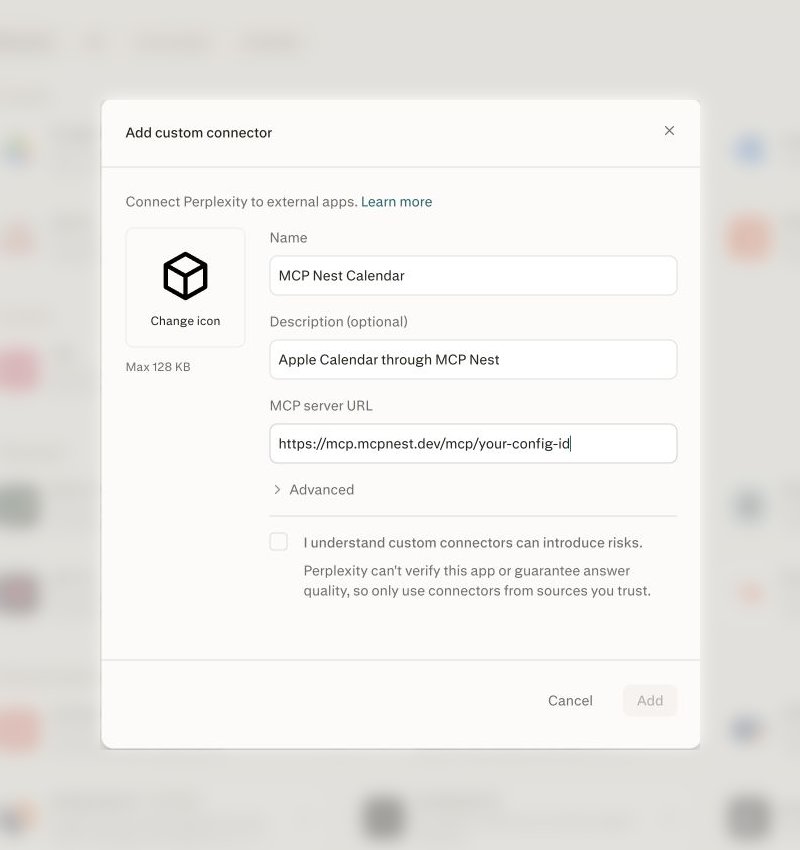
Fill out the form:
-
Name:
MCP Nest(or whatever you want to call it) - Description: optional
- MCP server URL: the Streamable HTTP Endpoint from the OAuth (Claude, Cursor, etc.) tab in your dashboard
-
Name:
-
Check the acknowledgment that you trust the connector, then click Add.
-
If you used the Streamable HTTP Endpoint, click Connect or Authorize next to the new entry. Perplexity redirects to MCP Nest to grant access, then returns.
Ask a question that needs one of your tools and Perplexity will call it as part of answering, alongside its normal web search.
What the tools look like
MCP Nest aggregates every server in a config behind one connector, namespacing tools as
<server>__<tool>. A config with a flights server exposes
flights__search_flights, flights__find_airports, and so on.
Perplexity leans towards web search when a question is ambiguous. Mentioning the source (“check my calendar for Thursday”, “search my Fastmail for the invoice”) steers it to the connector instead.
Keep the tool list short
Perplexity has to choose between your tools and its own search on every query, and a
sprawling tool list makes that choice worse. Disable the tools you don’t need from the
MCP Nest dashboard; the toggles are per-user and remove them from tools/list without
a redeploy. See how to disable individual MCP tools.
If you want a genuinely narrow connector, give Perplexity its own config with only the servers it should reach. Deploying multiple separate configurations covers that.
Troubleshooting
The connector fails to save, or no tools show up. A deployment still in progress returns a 404 status code rather than an empty tool list, which causes some clients to reject the endpoint. Wait until the MCP Nest dashboard shows the deployment as Active, click Refresh, then reconnect in Perplexity.
Authorization fails or loops. Make sure you’re signed in to mcpnest.dev in the same browser Perplexity redirected. If OAuth still won’t complete, fall back to the Authenticated URL, which skips the handshake entirely.
Perplexity answers from the web instead of calling a tool. Say what you want it to use. Naming the server or the data (“my calendar”, “my mailbox”) is usually enough.
A tool call errors out. The error is coming from your MCP server. Open the Logs page in MCP Nest; a missing or expired API key in the server’s environment is the most common cause.